
Reverse Geocoding
Reverse geocoding converts geographic coordinates (latitude/longitude) into human-readable addresses.
When to Use
Use reverse geocoding when you have:
- GPS coordinates from mobile devices
- Location data from IoT sensors
- Coordinates from mapping applications
- Lat/long values that need address labels
How to Use
Step 1: Prepare Your File
Your file should have columns for latitude and longitude:
csv
id,latitude,longitude
1,40.7128,-74.0060
2,34.0522,-118.2437
3,41.8781,-87.6298
Step 2: Select Reverse Geocoding Mode
After uploading, toggle the geocoding mode to Reverse Geocoding.
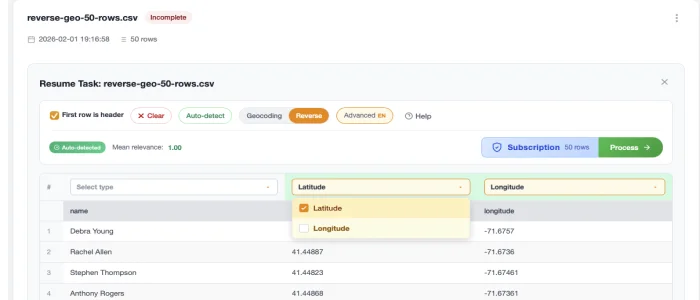
Step 3: Map Coordinate Columns
Select which columns contain:
- Latitude - Values typically between -90 and 90
- Longitude - Values typically between -180 and 180
Step 4: Process
Click Process and wait for results.
Results
Your output will include:
| Field | Description |
|---|---|
| Street Number | Building number |
| Street | Street name |
| City | City name |
| State | State/province |
| Zip | Postal code |
| Country | Country name |
| Formatted Address | Complete formatted address |
Coordinate Formats
CSV2GEO accepts coordinates in decimal degrees format:
Valid Formats
40.7128(decimal degrees) ✓-74.0060(negative for West/South) ✓
Not Supported
40° 42' 46"(degrees/minutes/seconds) ✗N 40.7128, W 74.0060(cardinal directions) ✗
Convert DMS to decimal degrees before uploading.
Next Steps
- Interactive Maps - Visualize your data
- Download Results - Export options